API y exports
Guía técnica basada en el recurso nw_notify 1.0.0.
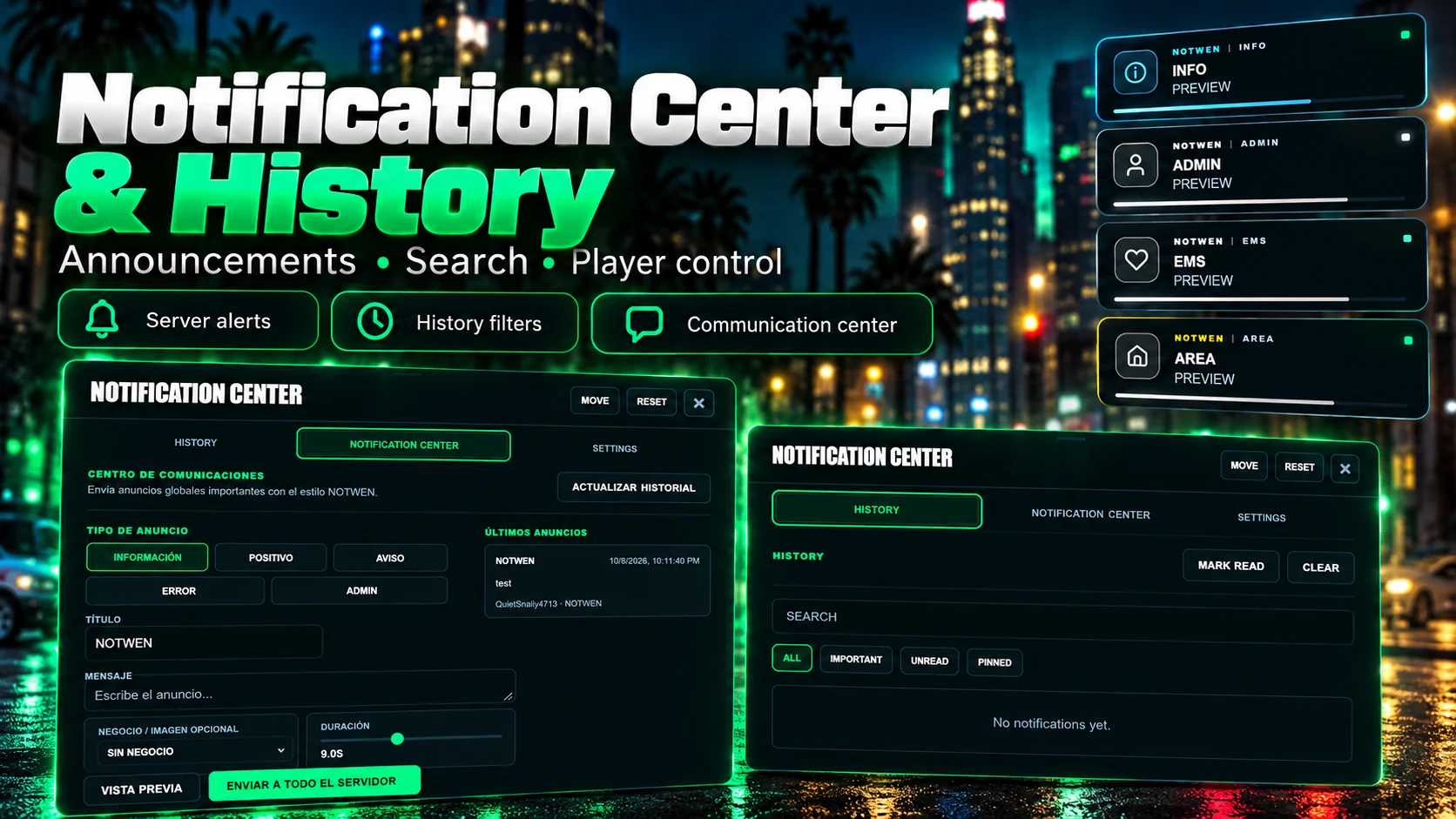 Probar demo ↗
Client: simple notification
exports['nw_notify']:Notify('Vehicle stored.', 'success', 4500, 'GARAGE')
Client: object API
local id = exports['nw_notify']:Notify({
    id = 'vehicle_keys',
    title = 'VEHICLE',
    message = 'You received the vehicle keys.',
    type = 'success',
    duration = 5000,
    position = 'top-right',
    priority = 'normal',
    channel = 'toast',
    icon = 'key',
    progress = true
})
Update / remove
exports['nw_notify']:UpdateNotification('download', {
    message = 'Downloading vehicle data...',
    progressValue = 82,
    persistent = true
})

exports['nw_notify']:RemoveNotification('download')
exports['nw_notify']:ClearNotifications()
Smart Stack
Explicit grouping:
exports['nw_notify']:Notify({
    groupKey = 'inventory:water',
    title = 'INVENTORY',
    message = 'Received Water',
    type = 'success',
    smart = { mode = 'count' }
})
Repeated calls become one card with ×2, ×3, etc.
Use smart = { mode = 'replace' } to replace content instead of incrementing the counter.
NW Notify can also auto-group identical active notifications when Config.SmartQueue.autoGroupDuplicates = true, so third-party resources benefit even when they do not provide a groupKey.
Group cooldown
exports['nw_notify']:Notify({
    groupKey = 'garage:locked',
    message = 'Vehicle is locked.',
    type = 'warning',
    cooldown = 1500
})
Priorities
priority = 'low'      -- background information
priority = 'normal'   -- default
priority = 'high'     -- important
priority = 'critical' -- urgent
When enabled in Config.SmartQueue.preemption, high/critical notifications can temporarily displace visible low/normal cards. Displaced timed cards return to the queue with their remaining duration. Interactive action cards are not preempted.
Custom types
Add a type only in config/config.lua:
Config.Types.police = {
    title = 'POLICE',
    color = '#62B7FF',
    icon = 'shield'
}
Then use it normally:
exports['nw_notify']:Notify({
    type = 'police',
    message = 'Unit assigned.'
})
The color affects the semantic icon/progress accent; titles follow the Notwen theme text color.
Help Notify
Help prompts use their own channel and the local notwen_notify_info.wav neutral cue automatically. They are world-space by default and use the same staged projected behaviour as nw_fuel: at far discovery range the Fuel lightbulb marks that an interaction exists, at medium range only the interaction key is shown, and close to the target the full key + text speech bubble is shown. Default thresholds are 7.0m, 4.5m, and 2.55m respectively and can be changed in Config.Help. If no anchor is supplied, NW Notify automatically tries to attach the prompt to the nearest NPC in front of the player; it does not attach to the local player by default.
exports['nw_notify']:ShowHelp('Press [E] to open the garage.', {
    id = 'garage-help',
    icon = 'vehicle',
    actions = {
        { key = 'E', label = 'OPEN', event = 'my_garage:open', dismiss = false }
    }
})
To place the bubble above the NPC / ped being interacted with, pass the entity handle:
exports['nw_notify']:ShowHelp('Press [E] to interact.', {
    id = 'dealer-help',
    entity = dealerPed
})
You can also anchor it to world coordinates. height is added to the supplied base coordinate; exactCoords = true uses the coordinate without the extra vertical lift.
exports['nw_notify']:ShowHelp('Press [E] to interact.', {
    id = 'world-help',
    coords = vector3(215.0, -810.0, 30.0),
    height = 1.32
})
Hide it:
exports['nw_notify']:HideHelp('garage-help')
If no ID is supplied, Config.Help.defaultId is used and subsequent calls replace the same help card.
Interactive actions
exports['nw_notify']:Notify({
    id = 'dispatch-call',
    title = 'DISPATCH',
    message = 'Robbery reported near Legion Square.',
    type = 'warning',
    persistent = true,
    actions = {
        {
            key = 'E',
            label = 'SET GPS',
            event = 'my_dispatch:setGps',
            args = { x = 215.0, y = -810.0 },
            dismiss = true
        },
        {
            key = 'G',
            label = 'DISMISS',
            dismiss = true
        }
    }
})
Supported action destinations: local handler, client event, serverEvent, or command. Server-side actions must validate permissions/state on the server.
Announcements
exports['nw_notify']:Notify({
    title = 'SERVER',
    message = 'Restart in 10 minutes.',
    type = 'warning',
    channel = 'announcement',
    priority = 'high',
    duration = 8000
})
Server-wide:
exports['nw_notify']:AnnouncementAll('Restart in 10 minutes.', 'warning', 8000, 'SERVER')
Preset announcements reuse the same engine and add no background loop:
-- Client
exports['nw_notify']:AnnouncementPreset('Maintenance starts in 10 minutes.', 'maintenance')

-- Server: one player
exports['nw_notify']:AnnouncementPreset(source, 'important', 'Your vehicle will be impounded.')

-- Server: everyone
exports['nw_notify']:AnnouncementPresetAll('restart', 'Server restart in 10 minutes.')
Available defaults are normal, important, maintenance, restart and event; edit them in Config.Announcements.presets.
Server API
local id = exports['nw_notify']:NotifyPlayer(source, {
    title = 'BANK',
    message = 'Payment received: **$1,250**',
    type = 'bank',
    richText = true
})

exports['nw_notify']:UpdateNotification(source, id, {
    message = 'Payment received: **$1,500**'
})

exports['nw_notify']:ShowHelp(source, 'Press [E] to interact.', {
    id = 'shop-help'
})

exports['nw_notify']:HideHelp(source, 'shop-help')
History / settings / diagnostics
local history = exports['nw_notify']:GetHistory()
local settings = exports['nw_notify']:GetSettings()
local types = exports['nw_notify']:GetTypes()
local stats = exports['nw_notify']:GetDeveloperStats()

exports['nw_notify']:OpenHistory()
exports['nw_notify']:OpenSettings()
exports['nw_notify']:ClearHistory()
Sounds
Every standard notification defaults to the local NOTWEN cue mapped for its notification type.
For a direct non-help notification that must use the help preset:
sound = 'helpnotify'
Notification payloads are restricted to the four NOTWEN notification cues and cannot select UI-only sounds.
Adaptive Stack / Reserved Zones
Register a normalized screen zone from any client resource. The returned token is namespaced to the calling resource:
local zone = exports['nw_notify']:RegisterReservedZone('main-hud', {
    x = 0.00, y = 0.72, width = 0.30, height = 0.28,
    channels = { toast = true, help = true }
})

exports['nw_notify']:UpdateReservedZone(zone, {
    x = 0.00, y = 0.70, width = 0.32, height = 0.30,
    channels = { toast = true, help = true }
})

exports['nw_notify']:RemoveReservedZone(zone)
The NUI only recalculates when stacks/zones/resolution change; there is no per-frame avoidance loop. Zones registered by another resource are automatically removed when that resource stops.
Server-locked player settings
Config.PlayerSettings.locks enforces immutable values from Config.PlayerSettings.defaults. A locked control remains visible but disabled in Settings. Locks are enforced again in Lua on save, so NUI payloads cannot bypass them.
Presets / accessibility
Config.PlayerSettings.presets defines player layout presets. accessibilityProfiles can apply reduced motion and the high-readability mode while preserving the Notwen palette.
Business notifications (server)
exports['nw_notify']:NotifyBusiness('mechanic', 'New service request.', 'business', 4500)
exports['nw_notify']:NotifyJob('police', 'Priority dispatch.', 'police', 5000, nil, { priority = 'high' })

local businesses = exports['nw_notify']:GetBusinesses()
exports['nw_notify']:RefreshBusinesses()
Runtime registration:
exports['nw_notify']:RegisterBusiness('myjob', {
    label = 'My Business',
    locations = { { x = 1.0, y = 2.0, z = 3.0, radius = 35.0 } }
})
Batch registration is also available for job-creator resources:
exports['nw_notify']:RegisterBusinesses({
    mechanic = { label = 'Mechanic' },
    taxi = { label = 'Taxi' }
})
Automatic zones (client)
local zoneId = exports['nw_notify']:RegisterZone('warehouse', {
    x = 100.0, y = 200.0, z = 30.0, radius = 45.0,
    label = 'WAREHOUSE', category = 'environment', type = 'area'
})

exports['nw_notify']:UpdateZone(zoneId, { x = 120.0, y = 210.0, z = 30.0, radius = 50.0, label = 'WAREHOUSE' })
exports['nw_notify']:RemoveZone(zoneId)
Rules metadata
Any canonical notification can include category, business/job, priority, channel and bypassFocus. Critical priority and protected categories follow the server policy in Config.Rules.
Business catalog / Rules notes
The server business catalog combines framework jobs, optional SQL metadata/locations, editable config and runtime registrations. Client catalog sync is minimized to location-bearing visible entries by default.
For server-specific SQL schemas, business visibility options, Qbox multijob behavior and automatic business zones, see BUSINESSES_ZONES.md.
For Focus/DND behavior and resource/job route precedence, see RULES_FOCUS.md.
Rotated runtime zone example:
local id = exports['nw_notify']:RegisterZone('airport-service', {
    shape = 'box',
    x = -1037.0, y = -2737.0, z = 20.0,
    width = 140.0, length = 90.0, heading = 330.0,
    minZ = 0.0, maxZ = 60.0,
    title = 'AIRPORT', type = 'area', category = 'environment'
})
Theme Engine
Client:
local theme = exports['nw_notify']:GetTheme()
Server:
local theme = exports['nw_notify']:GetServerTheme()
exports['nw_notify']:SetServerTheme({ accent = '#D9FF43', background = '#000000', text = '#F5F7F7' })
exports['nw_notify']:ResetServerTheme()
In-game server theme editing is protected by Config.Theme.adminAce.
NPC speech-bubble anchoring
Help prompts anchored to a ped use the ped entity centre for X/Y plus Config.Help.pedAnchorHeight on world Z (default 1.32). This deliberately matches nw_fuel and avoids lateral drift caused by head-bone rotation. pedHeadOffset remains available as an optional small world-Z fine tune. The distant E indicator and the close speech bubble share the same NPC anchor.